Use the last version of Altitude Premium.
Visit this page
http://powerd911.guru/comment-ouvrir-un-incident-sap/?doing_wp_cron=1530980072.2695930004119873046875
See this text on the original Page- The URL color is not set correctly
Accédez au portail de support SAP et cliquez sur Afficher mon tableau de bord (Access my Lauchpad);
Vous pouvez également accéder directement à l’application Signaler un incident en sélectionnant la vignette Report an Incident ou en accédant directement à LaunchPad Support.
See this text on the original Page – You can see the URL link in RED
Vous pouvez signaler un incident à partir du tableau de bord de support SAP ONE Support Lauchpad, toujours disponible depuis la page d’accueil du portail de support SAP. Pour créer un incident, votre S-User ID doit avoir les autorisations nécessaire afin de créer des incidents. Si vous n’êtes pas sûr de votre autorisation, vérifiez auprès de votre administrateur.
Note : Same problem with or without personnalization
Personnalisation ▸ Design Options Custom CSS
a:link {color:#1cc939;} /* unvisited link */
a:visited {color:#f20723;} /* visited link */
a:hover {color:#2568e6;} /* mouse over link */
Here’s what my front page should look like w/logo at the top, green side panels, drop down menu appears properly over the slider, and the slider transitions as it should. This appears correctly in Chrome, Safari, and Firefox:
http://www.swmedcenter.com/wp-content/uploads/2018/06/Ambition-Chrome-Main-Page.jpeg
Here’s what happens to the same page in Internet Explorer (version 11).
http://www.swmedcenter.com/wp-content/uploads/2018/06/Ambition-IE-Main-Page.jpeg
Using Internet Explorer, my site crams my main top menu up into the right corner and the dropdown menus are cut off by other menu items. The menu also appears behind the featured slider. The slider itself does not rotate in IE. It also just appears in general that the page is almost zoomed in really far.
The only active plugin I’m operating is Google Maps WD and the only custom CSS I’m using is to delete the author and date on posts. Here’s the code I’m using for that:
.entry-meta .author, .entry-meta .cat-links {display: none; }
.entry-meta .date {display: none; }

#access a {
    -webkit-box-sizing: content-box;
    -moz-box-sizing: content-box;
    box-sizing: content-box;
}
I absolutely love the site and want to find a way to make this front page work. Everything works flawlessly in the other browsers, unfortunately I know most users are probably using IE still.
Appreciate the assistance!
Hi Torrey,
Ops!.. You are talking about that info.
Yes, that is the custom CSS option that we have added into our theme before WP added Additional CSS option into the core.
Is there any CSS code that you have added before you update the theme?
Also if you are talking about the menu then yes we have change some styles for menu for better user experience.
Thank you!
Hi,
I already uploaded this issue earlier, but I don’t see it published so far. I am using a plugin called Soundy Playlist background music together with the Clean Retina Theme PRO. Unfortunately WordPress does not keep the actual playlist. After contacting the developer of the Plugin it seems that there is a bug in the Theme that stops Javascript at a certain point.It does not matter whether there is a playlist om the page our not, the bug is on all pages of the Theme. Here is a copy of the developer of the Soundy Plugin:
Hello Henny,
The server is running.Thanks.
I could do some debugging and discovered that the javascript engine is dying while executing the file:
https://allegrias.nl/wordpress/wp-content/themes/clean-retina-pro/library/js/jquery.fancybox-1.3.4.pack.js
It is dying at line 50 while executing the line:
M = b.browser.msie && b.browser.version < 7 && !window.XMLHttpRequest,
The javascript engine complains that the variable b.browser.msie is not defined.
This means that Soundy Javascript code is not executed at all because of this theme error, hence the playlist is not displayed as expected.
/Users/henny/Desktop/Schermafbeelding 2018-04-04 om 20.28.36.jpg
Hi Laura,
We have just removed previous script and added a new script that works for the navigation for better user experience, also with some modification in style.css file
Thank you!
Hi Laura,
You have to update your child theme as of the parent theme.
We have removed previous old menu script and added new script to support responsive menu for better user experience.
Thank you!
Hi Marcus,
Choosing the image size for featured slider is total control under user. However, we have used 2300px/1300px image size and also want to recommended you to choose large image for best quality.
Thank you!
Hi Anduin,
Sorry! We do not understand what you are trying to say?
If you are asking to have the pro version theme that you have purchased then just login to our site with the same username while you have purchased the theme and you will be redirected to your account page where you can see the download tab to download the Pro theme.
Thank you!
Hi James,
Yes you have to manually update the theme as you did before. To get the latest version of the theme login to our site with the same username while you have purchased the theme and download the theme file from you account page.
Thank you!
I’ve created a second slider. All works perfectly when viewed in Safari, IE & Chrome, but when viewed in Edge the first slider appears fine, but on transition only the image is displayed – no text and no buttons. When I mouse over the buttons they appear, but the text appears only a fraction of a second before the transition to the next slider – when the behaviour repeats, so after initial slider load no home page text is readable.
I’ve updated to the latest version of the theme, without any change in behaviour.
Any ideas on how to get this working in Edge? My target audience is Microsoft Office 365 users, and Microsoft recommends Edge as the preferred browser, so this is a big issue for me.
Thanks
Hi Doppa,
We have just made a WooCommerce compatible to the theme.
You will see the default WooCommerce buttons color and other color to the main theme color.
If you are a pro theme user then while changing the different color elements from the theme option this will also effect on elements of WooCommerce too.
Thank you!
I’m a user of Interface Pro, and rest satisfied this good theme.
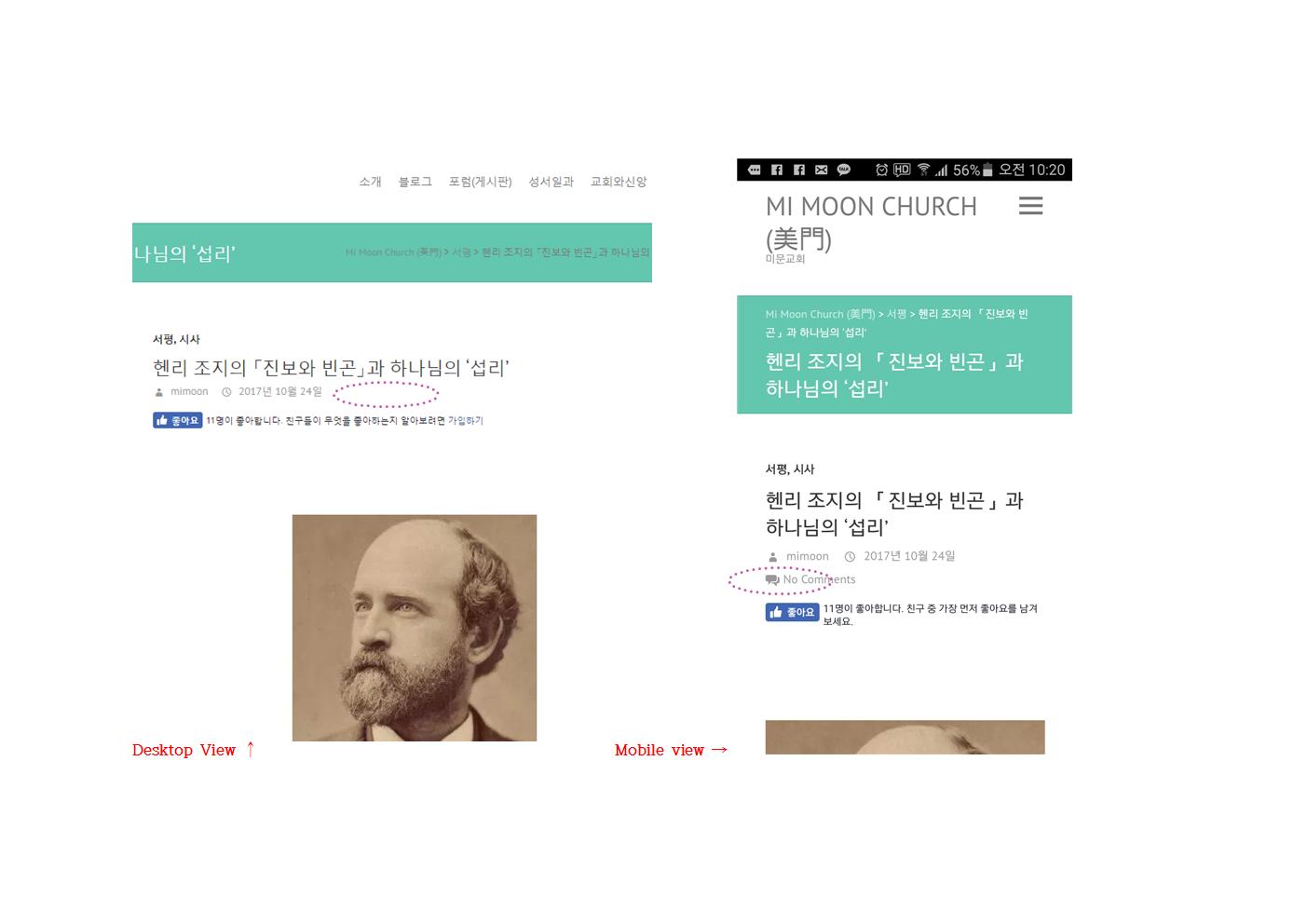
I have a question. How can I remove an element in the status display under the title of post.
It is a ‘comment count’ display.
I want to remove that in Mobile View.
Actually I could remove that elements before changing hosting server. But I can’t now remember where I could remove in this theme sources.
You can see the problem at this picture. ( http://mimoonchurch.com/wp-content/uploads/2017/11/comment_span001.jpg )
– That element is invisible in desktop view, but visible in mobile view. I want to remove in both environment.
This is url sample posting http://mimoonchurch.com/?p=4017 .
And one more question: Why I can’t find Pro Forum(Interface Pro)? I remember that I had asked at the Forum for Pro User.
Thank you.
Hi jr.cuaz,
Currently we don’t have demo content. For more information you can visit Documentation
Please Email Us your temporary username and password with site address. We will set a demo content for you. Don’t forget to send this forum link too.
Thank you!
Hi Russ,
It seems that you have removed the excerpt text to blank so that read more button is not displaying. Please add some text to display read more button.
If you don’t need some readmore on specific section then we can provide you some custom css. Please let us know.
We also check from our end and there is no any issue in our theme. Could you please Email Us us your temporary username and password. We will look into it.
Thank you!
Thanks for your response
Now the temporary User status has been changed to ADMINISTRATOR
Best Regards
LUIS